
The best photo editing apps for iPhone
I edit far more on my phone than I used to. Between two looks on a shoot, on the train back from a location, in a taxi before a client meeting: a quick grade, a selection for the client, a post for social media. The iPhone is now good enough for real work, as long as you choose the right app.
Here are the ten editing apps I think are worth knowing, with their pros and cons, what they cost, how they handle your files, how much space they take and what they collect about you. One of them is my own app, and I say so clearly when we get to it.
November 2026
By Antonio Barros
The ten apps at a glance
| App | Price model | Cost | Size | Best for |
|---|---|---|---|---|
| Apple Photos | Free, built in | Free | Already on your iPhone | Quick fixes without installing anything |
| Snapseed | Free, no in-app purchases | Free | 239 MB | Precise editing at no cost |
| Nimu | Free to use, one-time purchase | $ | 9 MB | Layers, and editing a whole series at once |
| Afterlight | Free, with subscription | $ | 519 MB | Film looks and textures |
| Darkroom | Free, with subscription or lifetime purchase | $$ | 298 MB | Editing your library directly, in batches |
| Photomator | Free, with subscription or lifetime purchase | $$ | 825 MB | Library editing with smart tools |
| VSCO | Free, with membership | $$ | 268 MB | A consistent look on social media |
| Lightroom | Free, with subscription | $$ | 372 MB | Raw files and syncing with a computer |
| Picsart | Free, with subscription | $$$ | 291 MB | Collages, stickers, templates and AI effects |
| Photoshop | Free, with subscription | $$$$ | 550 MB | Generative AI and PSD files |
Cost is a rough guide to what you pay in a year for the full version: $ is cheap, $$$$ is very expensive. "Free, with subscription" means the app installs for free but its best tools are paid. Prices change often, so check the App Store before you pay. Sizes are the download sizes shown on the App Store in November 2026, and they vary slightly with the iPhone model.
Files, privacy and tools compared
This is the part most comparisons skip. Where your photos live and what an app sends about you matter as much as its filters, especially when you edit client images or a collection that is not yet released.
| App | Where your edits live | Layers | Raw files | Account | App Store privacy label |
|---|---|---|---|---|---|
| Apple Photos | On the photo in your library, reversible | No | Yes | No | Apple system app, no label |
| Snapseed | Saves an edited copy to your library | No | Yes (DNG) | No | Linked to you: location, content, identifiers, usage, diagnostics |
| Nimu | Projects on the device, exports new pictures | Yes | Processed version only | No | Data not collected |
| Afterlight | Saves an edited copy to your library | No | Yes | No | Not linked to you: usage, diagnostics |
| Darkroom | Edits your library directly, reversible | No | Yes, including ProRAW | No | Not linked to you: purchases, usage, diagnostics |
| Photomator | Edits your library directly, reversible | No | Yes, including ProRAW | No | Not linked to you: purchases, diagnostics |
| VSCO | Imports into its own library | No | Yes | Required | Used to track you, plus a long list linked to you |
| Lightroom | Imports into its own library, cloud sync with a plan | No | Yes | Required | Used to track you, plus a long list linked to you |
| Picsart | Projects in the app and in your account | Yes | No | Pushed for most features | Used to track you, plus a long list linked to you |
| Photoshop | Cloud documents and PSD files | Yes | Yes | Required | A long list linked to you, including financial info |
Privacy labels are what each developer declares on the App Store, read in November 2026. They list what an app may collect, not what it always collects.
1. Apple Photos
The editor already on your iPhone is better than most people think: light, colour, a decent set of filters, cropping and straightening, and on recent iPhones a Clean Up tool that removes small distractions. Every edit can be undone, even months later.
- Pros: free and already installed, nothing to import, reversible edits that sync to your other Apple devices through iCloud Photos, and you can copy one photo's edits and paste them onto others.
- Cons: no layers, no masks to adjust only part of a picture, no curves, and a limited choice of looks.
2. Snapseed
Google's editor has been a favourite for years, and it is still completely free, with no subscription and no ads. The tools are precise: curves, selective adjustments by point, a brush, healing, perspective and raw development.
- Pros: nothing to pay and nothing locked, precise local adjustments, raw DNG support, no account.
- Cons: no layers, no real batch editing, and its privacy label lists location, content, identifiers and usage data linked to you.
3. Nimu: Photo Series Editor
I will be honest: Nimu is my own app. I designed it, so I am a little biased. But I am not listing it out of politeness. It is the editor I really use on my phone, and I made it because none of the others did exactly what I needed on the go.
Nimu has far fewer functions than Photoshop. There is no generative AI, no PSD file and no video. But it has the main tools I use every day: layers with blend modes and masks; a raw panel with light, colour, curves, colour mixer, colour grading, texture and lens blur; gradients, a brush and Select Subject to adjust only part of a picture; spot healing and a clone stamp for retouching; liquify, text, painting with Apple Pencil pressure, and 40 looks.
What I use most is series editing. I open up to 100 photos from the same shoot in one project, grade one, and every photo follows: the same look, the same title and the same logo across a whole lookbook. For a fashion story or a client selection, this is what saves me the most time.
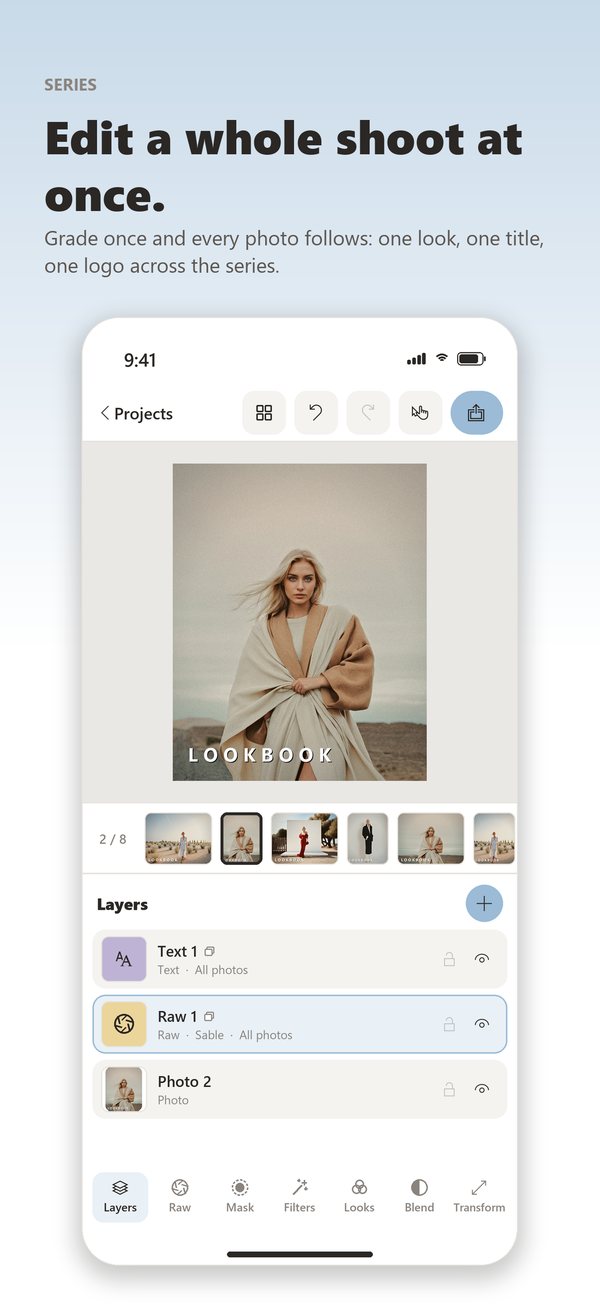
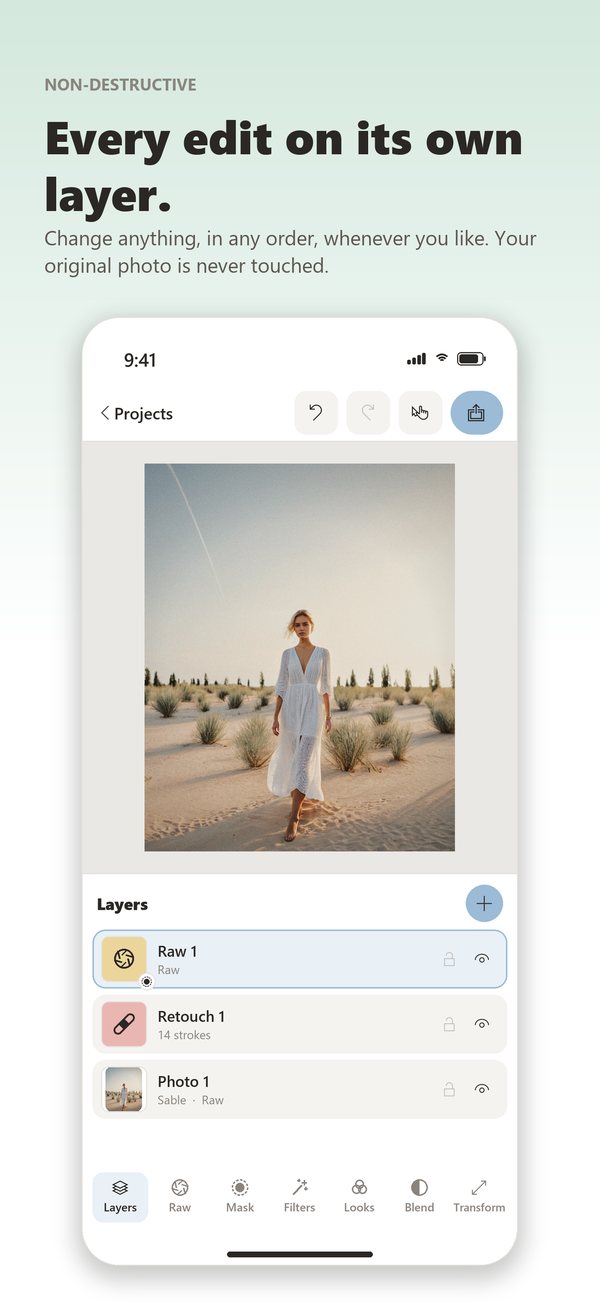
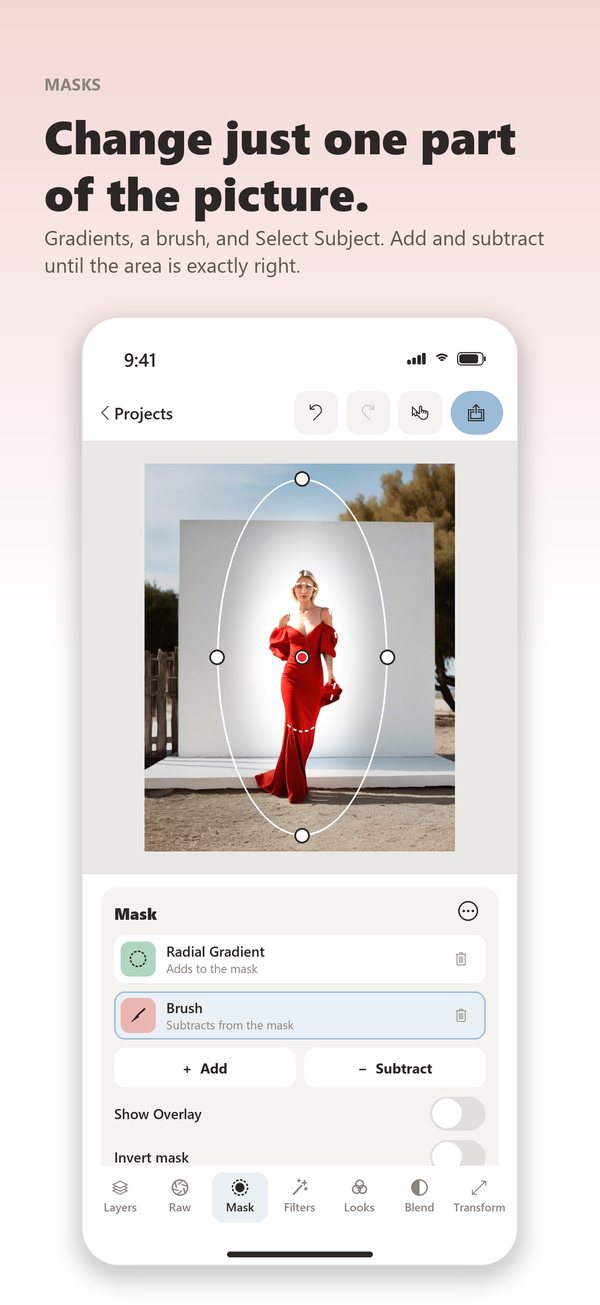
Nimu on iPhone: a series of eight photos graded together, the layers of one picture, and a mask that changes only the model.
- Pros: real layers on a phone, one grade for a whole series, every edit non-destructive, every tool free to use, a single payment instead of a subscription, a 9 MB download, and nothing collected at all: no account, no analytics, and it works in airplane mode.
- Cons: far fewer functions than Photoshop, no generative AI, no PSD files and no video, projects stay on the device that made them, and free exports are limited to 1,600 pixels with a small mark in the corner until you buy the full version. It is also a young app with few reviews so far.
Nimu on the App Store and the Nimu website
4. Afterlight
Afterlight is all about atmosphere: film looks, dust, light leaks and grain, with the basic adjustments around them. It has its own camera too.
- Pros: beautiful textures and film looks, one of the cheaper subscriptions, a light privacy label.
- Cons: most looks and textures are behind the subscription, few precise tools, and a large download for what it does.
5. Darkroom
Darkroom works straight on your photo library: no importing and no duplicate photos. It is excellent for batch work, with curves, a colour tool by hue, raw and ProRAW support, and it edits video too.
- Pros: edits your library directly and reversibly, batch editing, strong colour tools, a lifetime option instead of a subscription, a privacy label with nothing linked to you.
- Cons: the best tools are in the paid version, and there are no layers.
6. Photomator
Made by the Pixelmator team, now part of Apple. Like Darkroom, it edits your library directly, and it adds smart tools: automatic enhancement, denoise, super resolution, selective colour and batch editing.
- Pros: very polished, works on your library with no import, powerful smart tools, raw and ProRAW, a lifetime option, a privacy label with nothing linked to you.
- Cons: by far the largest download in this list at 825 MB, most tools need the paid version, and no layers.
7. VSCO
VSCO is as much a community as an editor. Its film presets are still among the most elegant, and it is a good choice if you want every post to share the same look.
- Pros: beautiful presets, an easy way to keep a consistent style, edits you can copy and paste between photos, a community to share your work.
- Cons: the best presets need a membership, an account is required, photos are imported into VSCO's own library, and its privacy label is the heaviest in this list, including data used to track you.
8. Lightroom
The professional standard for raw files. If you already use Lightroom on a computer, the mobile app syncs your presets and photos, and its masks can select the subject, the sky or the background automatically.
- Pros: the best raw development on a phone, automatic masks, removal and healing tools, presets shared with the desktop version, raw capture with its own camera.
- Cons: the most useful tools need a subscription, an Adobe account is required, photos are imported into Lightroom's library rather than edited in place, and the privacy label includes data used to track you.
9. Picsart
Picsart does a bit of everything: templates, stickers, collages, text, background removal and plenty of AI effects. It is more a creative toolbox than a photographer's editor.
- Pros: a huge range of creative tools, layers, ready-made social media formats.
- Cons: a crowded interface with constant offers to upgrade, an expensive subscription, little precision for colour work, and a privacy label that includes tracking.
10. Photoshop
Photoshop for iPhone brings layers, masks and generative AI to the phone, and its files open in the desktop version.
- Pros: the most complete editor in this list, generative fill and expand, real layers and masks, files that carry on on a computer.
- Cons: the most expensive, an Adobe account is required, the AI features need a connection, it is complex on a small screen, and its privacy label is long.
Which one should you choose?
- You want to pay nothing: Apple Photos for quick fixes, Snapseed for precise ones.
- You shoot raw and also edit on a computer: Lightroom.
- You want to edit your library directly, in batches: Darkroom or Photomator.
- You want layers, a whole series edited at once and total privacy: Nimu. Yes, I am biased.
- You want a film look for social media: VSCO or Afterlight.
- You need generative AI or PSD files: Photoshop.
- You make collages, stories and stickers: Picsart.
Frequently asked questions
Is the iPhone's own editor enough?
For straightening, cropping and correcting light and colour, often yes. As soon as you want to change only one part of a picture, retouch skin or remove a distraction precisely, you need another app.
Do I need raw files on an iPhone?
Not for everyday pictures. Raw and ProRAW keep more detail in the highlights and shadows, which helps in difficult light, but the files are much bigger. For most social media work, a well exposed HEIC or JPEG is enough.
Subscription or one-time purchase?
If you edit every day and use cloud features, a subscription can be worth it. If you edit a few times a week, a free app or a one-time purchase usually costs much less over a few years. Darkroom, Photomator and Nimu all offer a single payment.
Which apps keep my photos private?
Read the App Store privacy label before you install. In this list, Nimu declares that it collects no data at all, and Darkroom, Photomator and Afterlight declare only data not linked to you. Apps that need an account generally collect more.
See also The best camera apps for iPhone, the companion to this list, and my guides Content shoots for influencers and creators and 10 tips for fashion brands on how to create social media content.
Need images that are already edited and ready to publish? Send me a message about your next shoot.