
The best camera apps for iPhone
I shoot fashion with professional cameras, but my iPhone is always in my pocket: for location scouting, castings, polas, behind the scenes, and sometimes for pictures that end up being published. Apple's Camera app is excellent for snapshots, but it decides almost everything for you. A good camera app gives the decisions back: the shutter speed, the ISO, the focus, the file format and the look.
Here are the ten camera apps I think are worth knowing, with their pros and cons, what they cost, how much space they take and what they collect about you. One of them is my own app, and I say so clearly when we get to it.
September 2026
By Antonio Barros
The ten apps at a glance
| App | Price model | Cost | Size | Made for | Best for |
|---|---|---|---|---|---|
| Camera (Apple) | Free, built in | Free | Already on your iPhone | Photo and video | Fast everyday pictures |
| Project Indigo | Free, no in-app purchases | Free | 364 MB | Photo | Natural, low-noise photos with manual controls |
| Blackmagic Camera | Free, no in-app purchases | Free | 213 MB | Video | Film-style video |
| Final Cut Camera | Free, no in-app purchases | Free | 80 MB | Video | Pro video, and filming with several iPhones for an iPad |
| Nimu Cam | Free to use, one-time purchase | $ | 4.7 MB | Photo | Manual controls with fashion and film looks in the viewfinder |
| Moment Pro Camera II | Paid app, no subscription | $ | 44 MB | Photo and video | Full control for a single payment |
| Obscura | Free, with subscription | $ | 183 MB | Photo and video | A beautiful, simple manual camera |
| Halide Mark III | Free trial, then subscription or one-time purchase | $$ | 92 MB | Photo | Natural pictures without Apple's processing |
| ProCamera | Free trial, then subscription | $$ | 206 MB | Photo and video | Every professional setting in one app |
| Leica LUX | Free, with subscription | $$$ | 427 MB | Photo | Leica colour and lens simulations |
Cost is a rough guide to what you pay in a year for the full version: $ is cheap, $$$ is expensive. "Free, with subscription" means the app installs for free but its best tools are paid. Prices change often, so check the App Store before you pay. Sizes are the download sizes shown on the App Store at the time of writing, and they vary slightly with the iPhone model.
Controls, files and privacy compared
What separates a camera app from a filter app is control over the exposure and the file. And because a camera app can see everything you photograph, what it declares about your data matters too.
| App | Manual controls | Raw and pro formats | Looks in the viewfinder | App Store privacy label |
|---|---|---|---|---|
| Camera (Apple) | Exposure compensation only | ProRAW on Pro models, ProRes video | Photographic Styles | Apple system app, no label |
| Project Indigo | Full | DNG | One natural look | Not linked to you: location, identifiers, usage |
| Blackmagic Camera | Full, film camera style | ProRes and Apple Log video | Your own 3D LUTs | Data not collected |
| Final Cut Camera | Full | ProRes, Apple Log, ProRes RAW on supported iPhones | No | Linked to you: identifiers |
| Nimu Cam | ISO, shutter and focus (aperture simulated) | ProRAW on supported iPhones | 40 looks | Data not collected |
| Moment Pro Camera II | Full, plus shutter and ISO priority | RAW, ProRAW, TIFF, ProRes and Apple Log | Looks and your own LUTs | Linked to you: contact info |
| Obscura | Full | RAW, ProRAW | Filters, including your own | Not linked to you: identifiers, usage, diagnostics |
| Halide Mark III | Full, with focus peaking | RAW, ProRAW, Process Zero | Looks | Not linked to you: purchases, usage, diagnostics |
| ProCamera | Full, with focus peaking and zebras | RAW, ProRAW, TIFF | In its editor | Linked to you: contact info, content, diagnostics |
| Leica LUX | Full | RAW | Leica Looks and lens simulations | Used to track you: identifiers, usage |
Privacy labels are what each developer declares on the App Store. They list what an app may collect, not what it always collects. Every app in this list saves photos to your library, except Blackmagic Camera, which keeps its files in the app, in Files or in its own cloud.
1. Camera (Apple)
Apple's own app is the fastest to open and the one that gets the picture in difficult light, thanks to all the processing behind it. On recent iPhones, Photographic Styles change the look before you shoot, and Pro models record ProRAW and ProRes.
- Pros: free and already there, opens from the lock screen and the Camera Control button, excellent automatic results, Night mode and Portrait mode.
- Cons: no shutter speed, ISO or manual focus, heavy processing that smooths skin and sharpens edges, and you cannot really turn it off.
Camera is built into iOS, so there is nothing to download.
2. Project Indigo
An experimental camera from Adobe Labs. Every picture is a burst of frames merged together, for less noise and more range in the highlights and shadows, with a natural look closer to a real camera than to a phone.
- Pros: free with nothing to buy, a natural rendering, full manual controls, raw DNG files, a good Night mode.
- Cons: it is a lab project that may change or stop, it needs a recent iPhone, saving takes a moment, and there are no creative looks.
Project Indigo on the App Store
3. Blackmagic Camera
The interface of Blackmagic's cinema cameras on an iPhone: frame rate, shutter angle, white balance and ISO, with recording in ProRes and Apple Log. It is a video app first.
- Pros: completely free, the most complete video controls in this list, your own 3D LUTs, and nothing collected.
- Cons: made for video, not photos, a lot of settings for a beginner, and the files are very large.
Blackmagic Camera on the App Store
4. Final Cut Camera
Apple's professional video camera. It records ProRes and Apple Log, and up to four iPhones can film together for Final Cut Pro on an iPad.
- Pros: free, small, simple, and the best choice if you edit on Final Cut Pro for iPad.
- Cons: video only, no looks, and most useful inside Apple's own editing tools.
Final Cut Camera on the App Store
5. Nimu Cam
I will be honest: Nimu Cam is my own app. I designed it, so I am a little biased. But it is the camera I really use on my phone, and I made it because I wanted something none of the others gave me: a manual camera with the looks of a fashion magazine already in the viewfinder, before I press the shutter.
The controls are the real ones: ISO, shutter speed and focus, which you can set and lock so a series stays consistent. The aperture dial is marked simulated, because an iPhone lens cannot change its aperture, and I would rather say so. Then there are 40 looks, editorial grades and black and whites for magazine work, and vintage film stocks with grain and light leaks. A Darkroom applies the same looks to photos you already have, always as a new picture.
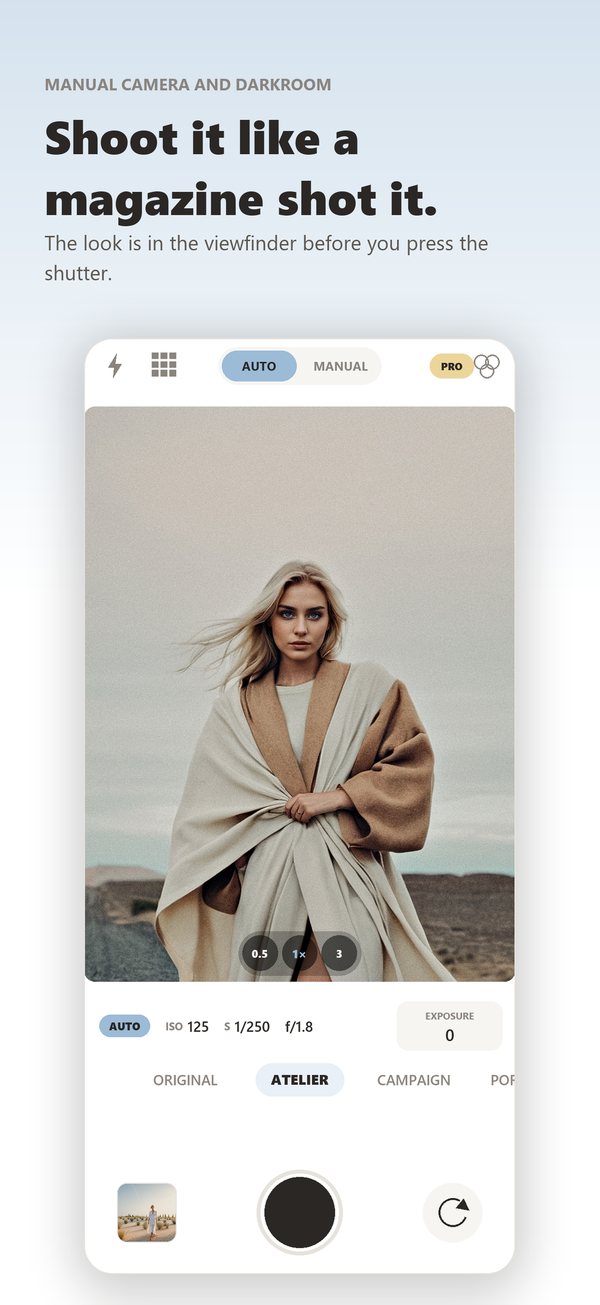
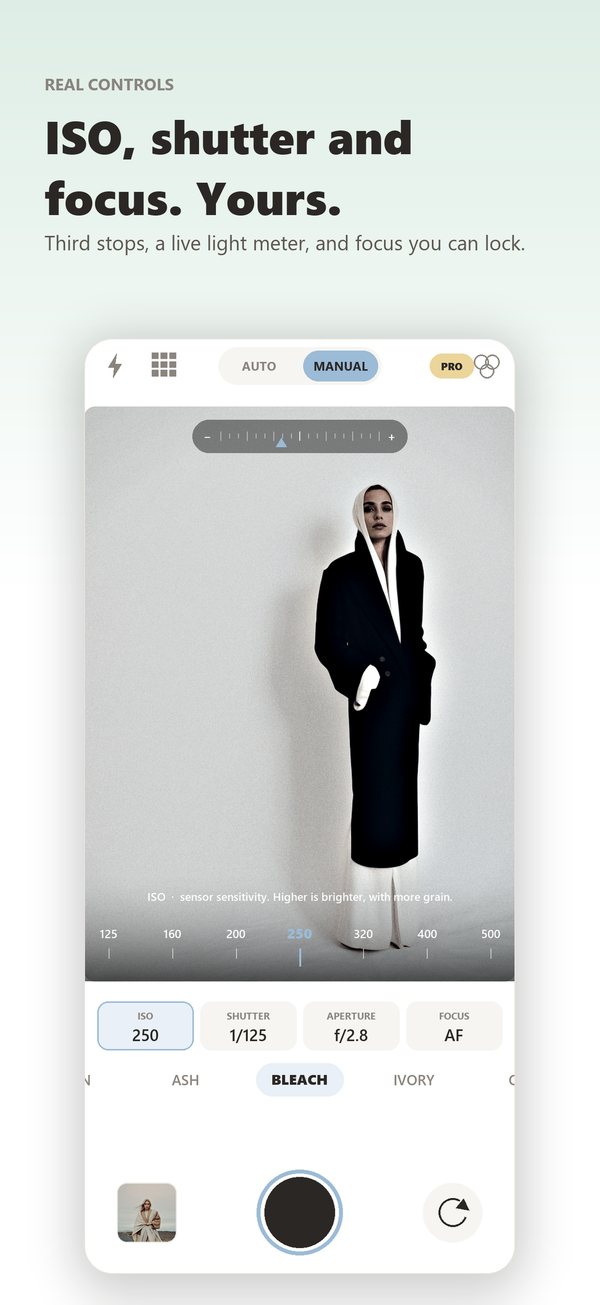
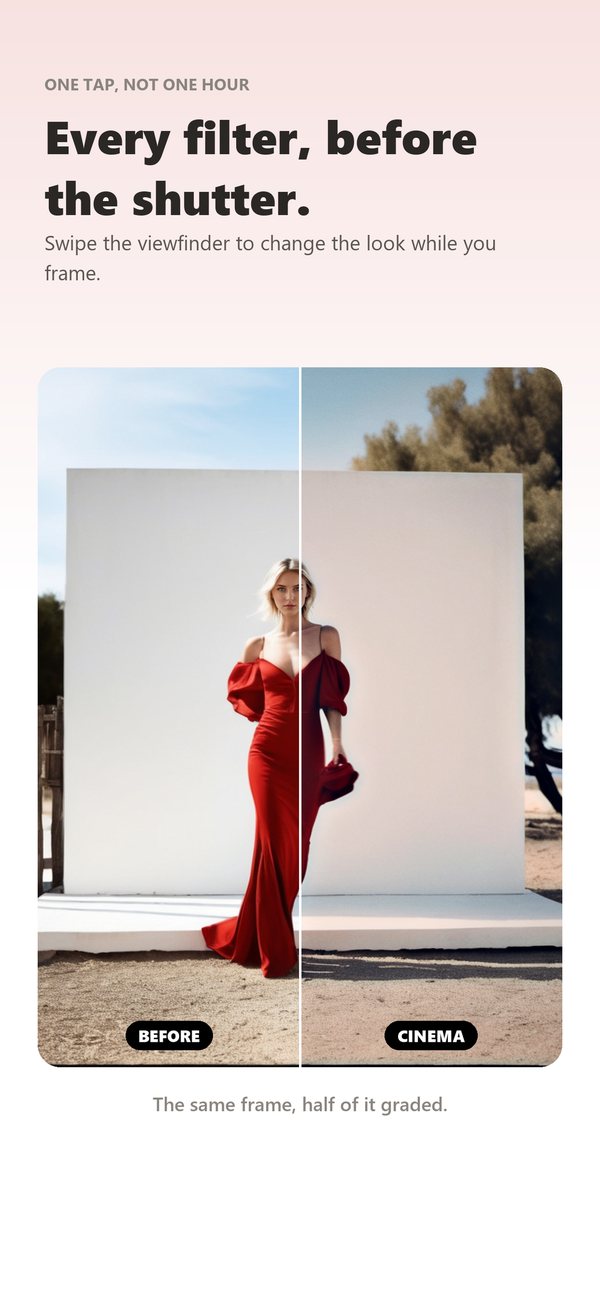
Nimu Cam on iPhone: a look in the viewfinder, the manual controls, and the same frame before and after.
- Pros: real manual controls and 40 looks you see before you shoot, ProRAW on the iPhones that support it, your name and copyright written into every photo, a histogram, grid and level, a 4.7 MB download, a single payment instead of a subscription, and nothing collected at all: no account, no analytics, and it works in airplane mode.
- Cons: no video, no focus peaking, the aperture is only simulated, shutter speeds stop at one second, and free saves are limited to 1,600 pixels with a small mark in the corner until you buy the full version. It is also a young app with few reviews so far.
Nimu Cam on the App Store and the Nimu Cam website
6. Moment Pro Camera II
From the makers of the Moment lenses. It covers photo and video with serious tools: shutter and ISO priority, waveform and histograms, RAW, ProRAW and TIFF, ProRes and Apple Log, and looks or your own LUTs previewed live.
- Pros: one payment and no subscription, very complete for both photo and video, a small download, works with Moment's lenses and accessories.
- Cons: you pay before you can try it, it is a recent rewrite, and its privacy label links contact info to you.
Moment Pro Camera II on the App Store
7. Obscura
Probably the most elegant camera app on the iPhone. Every control sits under one thumb, with haptics, live filters you can create yourself, a histogram, a level and focus peaking.
- Pros: beautiful and fast, RAW and ProRAW, custom live filters, a light privacy label, and a cheap upgrade.
- Cons: the premium features need an annual subscription, and the video tools are basic next to Blackmagic or Moment.
8. Halide Mark III
The reference for photographers on iPhone. Its Process Zero mode skips Apple's computational processing altogether, for natural pictures with real grain and contrast, and its focus peaking and loupe make manual focus easy.
- Pros: the most natural pictures in this list, excellent manual focus, Looks built into the capture, a one-time purchase option, a light privacy label.
- Cons: it is a paid app after a seven-day trial, there is no video (the same team makes a separate app for that), and Process Zero struggles more in low light than Apple's camera.
Halide Mark III on the App Store
9. ProCamera
One of the oldest professional camera apps, and still one of the most complete: separate focus and exposure, zebras, a grey card for white balance, RAW, ProRAW and TIFF, full video settings and a detailed metadata viewer.
- Pros: almost every setting a photographer could want, photo and video in one app, and an easy way to remove location data before you share.
- Cons: a subscription after the trial, an interface that feels busy, and contact info and content linked to you in its privacy label.
10. Leica LUX
Leica's own camera app brings its colour science and simulations of famous Leica lenses, with the background blur that goes with them, plus more than fifteen Leica Looks.
- Pros: beautiful colour and black and white, convincing lens simulations, manual controls and RAW.
- Cons: the most expensive in this list, most lenses and looks need the subscription, a large download, and a privacy label that includes data used to track you.
Which one should you choose?
- You want to pay nothing: Project Indigo for photos, Blackmagic Camera for video.
- You want the most natural photos: Halide Mark III.
- You want every setting, photo and video, for one payment: Moment Pro Camera II.
- You want a magazine or film look in the viewfinder, with total privacy: Nimu Cam. Yes, I am biased.
- You love the Leica look: Leica LUX.
- You film with several iPhones and edit on an iPad: Final Cut Camera.
- You just want the picture, fast: Apple's Camera, which is still the quickest.
Frequently asked questions
Can an app change the aperture of an iPhone?
No. iPhone lenses have a fixed aperture. Apps that show an aperture either simulate the exposure change, as Nimu Cam does, or create background blur in software, as Portrait mode and Leica LUX do.
Should I shoot raw on an iPhone?
For difficult light, or when you will edit the picture seriously, yes: raw and ProRAW keep much more in the highlights and shadows. For everyday pictures and social media, the files are big and the gain is small.
Why do photos from camera apps look different from Apple's Camera?
Apple's Camera merges several frames and applies strong processing: smoothing, sharpening and local tone changes. Apps like Halide or Project Indigo do less, or none, which gives a more natural, more photographic picture, with more grain in low light.
Which camera apps keep my photos private?
Read the App Store privacy label before you install. In this list, Nimu Cam and Blackmagic Camera declare that they collect no data at all, and Halide, Obscura and Project Indigo declare only data not linked to you.
See also my guides How to take proper polas and The future of photography: how technology is changing the industry.
For pictures that need more than a phone, send me a message about your next shoot.